
Yes, Squarespace is good for SEO if you run a small local business, a simple service website, or a personal portfolio. It provides all the basic technical foundations, mobile responsiveness, and clean code needed to rank well on Google without requiring any coding knowledge. However, if you have a large ecommerce store or need advanced technical control, Squarespace will limit your SEO growth.
This Squarespace SEO review explains what the platform does well, where it holds businesses back, and when it makes sense to stay, improve the setup, or move to a more flexible CMS.
Is Squarespace Good for SEO in 2026?
Squarespace is good for SEO in 2026 if you run a simple business website, a local service site, a portfolio, or a small online store. It gives you many of the essentials without plugins, including HTTPS, responsive templates, editable SEO titles and descriptions, clean URLs, automatic XML sitemaps, canonical URLs, and basic redirects.
Those basics are enough to help a well-planned website get indexed, appear in local results, and rank for relevant long-tail and lower-competition terms. The platform itself does not prevent Google from crawling or ranking your pages.
However, Squarespace is less suitable for a business that needs precise technical control. You may feel limited if you need custom schema across many templates, complex site architecture, large-scale redirect rules, detailed robots directives, advanced ecommerce SEO, or an efficient way to optimize hundreds of pages at once.
In simple terms, Squarespace has a good SEO floor and a lower SEO ceiling. It gets many important things right from day one, but it gives you fewer ways to go beyond the basics.
Squarespace SEO Features
Squarespace has improved far beyond its old reputation as a pretty website builder with weak SEO. In 2026, it provides a stable managed environment that removes many common technical problems small business owners face on self-hosted websites.
You do not need to manage hosting, security patches, caching plugins, or plugin conflicts. That simplicity has real value when you want to focus on customers, content, and sales instead of website maintenance.
Built-In Technical SEO Basics
Squarespace automatically creates an XML sitemap for your site. This helps search engines discover your pages, blog posts, products, and images without requiring a separate SEO plugin.
It also provides HTTPS on every site, responsive design templates, and hosted infrastructure. These are not unique advantages, but they are essential foundations that many small business websites still get wrong.
The platform also adds canonical URLs to reduce accidental duplicate-content issues. This is useful when similar URLs or page variations could otherwise confuse search engines.
On-Page SEO Controls
Business owners can edit page titles, SEO descriptions, URL slugs, headings, image alt text, and social sharing details inside the Squarespace editor. That makes the core on-page work straightforward.
For a local HVAC company, for example, a service page can target a specific phrase such as “AC repair in Austin, TX.” The business can use that topic naturally in the title tag, page heading, copy, image alt text, and internal links without touching code.
Squarespace also makes it relatively easy to create basic 301 redirects. This matters when you replace an old page, change a URL, or migrate content and want to preserve links and search visibility.
Core Web Vitals and Mobile Performance
Google heavily rewards websites that load quickly and look great on mobile devices. Squarespace templates are built to be inherently responsive. They automatically adjust images and text to fit any screen size perfectly.
Recent data shows that Squarespace sites often pass Core Web Vitals at a higher rate than average WordPress sites. This happens because the platform restricts the use of heavy third-party plugins that typically slow down open-source websites. Your site stays fast because Squarespace controls the entire hosting environment.
User-Friendly SEO Panel
Squarespace offers a dedicated SEO panel for every page, blog post, and product on your site. This simple interface lets you add custom meta titles and descriptions in seconds. It even shows you a live preview of how your page will look in Google search results.
This centralized approach makes on-page optimization incredibly easy. You can update your meta information without navigating through complex menus or writing any code. It removes the friction from basic SEO tasks, encouraging users to actually complete them.
URL Mapping and Redirects
Changing a page URL without setting up a redirect will result in a 404 error and lost rankings. Squarespace handles 301 redirects through a simple URL mapping panel in the backend. You just type in the old URL and point it to the new one.
However, there is no way to manage these redirects in bulk using a simple plugin. If you are migrating a massive website to Squarespace, typing out hundreds of redirect rules manually is incredibly tedious. The system works well for small updates but fails at scale.
Image SEO
Optimizing images is critical for both page speed and appearing in Google Image Search. Squarespace allows you to easily add alt text to any image block on your site. It also compresses images automatically upon upload to help them load faster.
Unfortunately, the platform still does not natively support next-generation image formats like WebP. This forces you to use heavier JPEG or PNG files, which can slightly hurt your mobile performance scores. Until Squarespace fully embraces modern image formats, this will remain a frustrating limitation.
Schema Markup
Schema markup helps search engines understand the exact context of your content. Squarespace automatically generates basic local business and product schema for you. This helps your products show up with price tags and reviews in search results.
The problem is that you cannot customize this default schema without custom coding. If you want to add FAQ schema to a blog post, you have to generate the code externally and inject it manually. This manual process is exactly what business owners hope to avoid when using a website builder.
Blog and Content Architecture
Blogging is the most effective way to target long-tail keywords and drive informational traffic. The Squarespace blogging engine is visually stunning and easy to format. You can easily categorize posts, add tags, and assign authors.
However, you cannot optimize category or tag pages with custom meta descriptions. These archive pages often generate duplicate content issues if not managed carefully. If content marketing is your primary growth strategy, you might find these architectural limits annoying.
Is Squarespace Good for AI SEO in 2026?
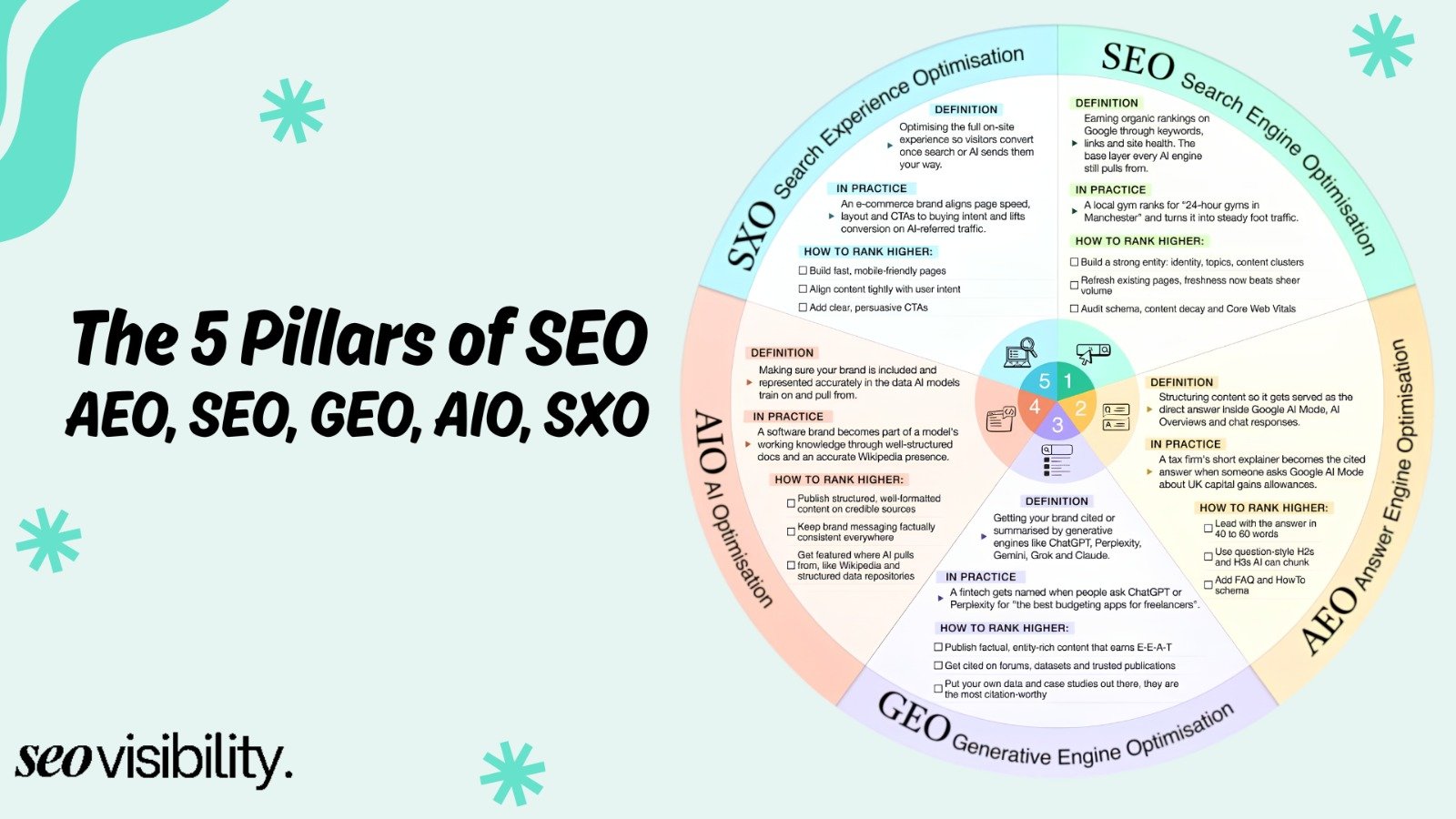
Search engines are evolving rapidly, with AI overviews taking up more space at the top of results pages. Business owners are now asking if Squarespace is good for SEO in 2026, specifically regarding artificial intelligence.
Optimizing for Google AI Overviews
AI search engines rely heavily on clear, well-structured content to formulate their answers. Squarespace naturally enforces good semantic HTML structure by using clear heading blocks and text formatting tools. This clean code makes it very easy for AI bots to parse and understand your written content.
If you write high-quality, direct answers to common user questions, your Squarespace site can absolutely trigger AI overviews. The platform itself does not hinder your ability to rank in these new search features. The deciding factor is the depth and quality of your content, not the software hosting it.
Managing AI Bot Crawling
As AI companies scrape the web for training data, many website owners want to block specific AI bots from accessing their content. Because Squarespace limits access to the robots.txt file, managing these bots is more difficult. You cannot simply drop a blocklist of AI crawlers into your root directory.
Squarespace has introduced some basic toggles to deter AI scraping, but these lack granular control. If protecting your intellectual property from AI scrapers is a top priority, a self-hosted platform gives you much better defense mechanisms.
Squarespace Vs WordPress: The 2026 SEO Showdown
The most common question business owners ask is how Squarespace compares to WordPress. Both platforms can rank on the first page of Google, but they take completely different approaches to getting there.
Control Vs Convenience
WordPress gives you total control over every single line of code on your server. You can install caching plugins, modify core files, and customize your database for maximum speed. This ultimate freedom is exactly why seasoned SEO professionals prefer WordPress.
Squarespace trades this total control for absolute convenience. You never have to update a theme, patch a security vulnerability, or worry about a plugin breaking your site. You get a fast, secure website out of the box, allowing you to focus entirely on marketing and content creation.
Maintenance and Security
A hacked website will lose its Google rankings overnight. WordPress sites require constant maintenance to stay secure against malware and brute-force attacks. If you neglect these updates, your SEO efforts are at severe risk.
Squarespace handles all security and hosting maintenance internally. Your site is protected by enterprise-grade security without any effort on your part. For many small business owners, this peace of mind is worth sacrificing a few advanced SEO features.
Comparing the Top Website Builders
To make your decision easier, let us compare how the top platforms handle search optimization. This simple breakdown highlights where each system excels.
| SEO Feature | Squarespace | WordPress | Wix |
|---|---|---|---|
| Ease of Use | Very High | Low | High |
| Technical Control | Low | Very High | Medium |
| Plugin Ecosystem | Limited | Massive | Growing |
| Maintenance Required | None | High | None |
| Best For | Portfolios, Local Sites | Large Blogs, Enterprise | Small Business |
| Core Web Vitals | Often Passes by Default | Requires Optimization | Often Passes |
As the table shows, there is no perfect platform. Your choice depends entirely on your technical skills and the size of your project.
Is Squarespace Good for Ecommerce SEO?
Running an online store introduces entirely new SEO challenges, such as managing product variants and inventory. Evaluating Squarespace for ecommerce requires looking at how it handles these specific retail needs.
Strengths for Small Stores
If you sell a small selection of artisan goods or digital products, Squarespace is excellent. It automatically generates the correct product schema so your items appear properly in Google Shopping. The checkout process is hosted on a secure, fast-loading domain.
You can easily customize the meta title and description for every individual product in your catalog. The platform also automatically manages canonical tags to prevent product category pages from causing duplicate content. For a store with fewer than two hundred items, this is incredibly efficient.
Large Catalog Limitations
The platform begins to struggle when you introduce thousands of SKUs and complex product categories. There is no native way to bulk-edit SEO settings across hundreds of products simultaneously. You will spend hours clicking through individual menus just to update a seasonal meta description.
Additionally, the faceted navigation filters on Squarespace are quite basic. Large ecommerce stores rely on complex filtering systems that generate SEO-friendly URLs for specific product attributes. If you want to build the next Amazon, you need Shopify or WooCommerce, not Squarespace.
Is Squarespace Good for Local SEO?
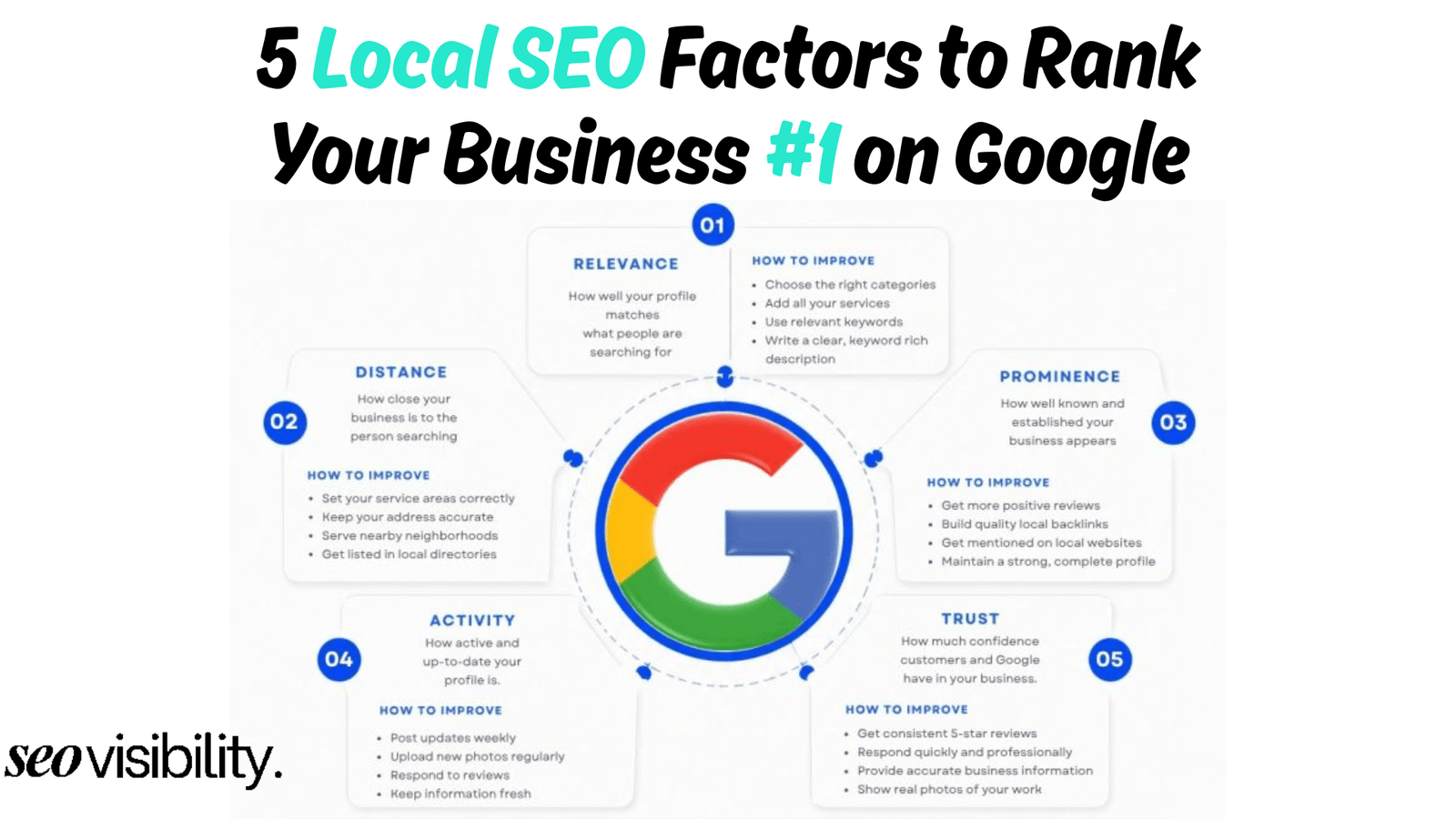
Local businesses like plumbers, accountants, and cafes rely heavily on local search visibility to drive foot traffic. Squarespace is actually one of the best platforms for this specific type of marketing.
Local Schema and NAP Consistency
Google relies on your Name, Address, and Phone number (NAP) to verify your local business identity. Squarespace makes it very simple to embed a Google Map and consistent contact information in your website footer. This ensures your NAP data is perfectly consistent across every single page.
The platform also applies basic local business schema to your site automatically. This invisible code helps Google connect your website to your Google Business Profile. These built-in features give local service providers a massive advantage right from the start.
Location Pages Setup
Ranking in multiple cities requires building dedicated service area pages. Squarespace allows you to quickly duplicate page layouts to build out robust local SEO silos. You can maintain a consistent, beautiful design across dozens of different city pages.
The simple URL structure also helps keep your location pages organized cleanly. A local business owner can build a highly effective local SEO campaign on Squarespace without ever touching a line of code. It is efficient, reliable, and highly effective for local domination.
Who Should Actually Use Squarespace for SEO?
The debate over website builders often ignores the reality of running a small business. Not everyone has the budget to hire a dedicated web developer or an agency.
Service Businesses and Consultants
Therapists, lawyers, business coaches, and financial advisors are perfect candidates for Squarespace. These businesses compete on trust, expertise, and local reputation rather than massive technical infrastructure. A clean, professional Squarespace site optimized for local keywords will perform exceptionally well.
These owners do not need complex schema or bulk-editing tools. They simply need a fast website where they can publish thought leadership articles and collect leads. Squarespace delivers exactly this without any administrative headaches.
Portfolios and Creatives
Photographers, designers, and illustrators need websites that put their visual work front and center. Squarespace templates are widely considered the most beautiful in the industry. The platform automatically compresses high-resolution images so your portfolio loads quickly on mobile devices.
Since these businesses usually target highly specific niche keywords or local terms, the basic SEO tools are plenty. A wedding photographer in Chicago can easily rank number one using just the built-in Squarespace features.
Small Local Businesses
Cafes, boutique shops, and local gyms do not need enterprise-level technical SEO. They need to rank for “gym near me” or “best coffee shop in Brooklyn.” Squarespace integrates perfectly with Google Business Profiles to support these local goals.
The platform allows these owners to manage their own websites without fear of breaking the code. This independence saves money and allows for faster marketing updates.
Who Should Avoid Squarespace?
While the platform is great for many, it is a terrible choice for certain business models. Choosing Squarespace for the wrong project will result in expensive migrations down the road.
Enterprise Level Websites
Massive corporations require custom server environments, advanced security protocols, and deep integrations with legacy software. Squarespace is a closed ecosystem that cannot accommodate these complex demands. Enterprise SEO campaigns require total server control, which this platform explicitly denies.
Content Publishers
If your business model relies on publishing ten articles a day and monetizing through display ads, avoid Squarespace. The platform lacks the granular taxonomy controls and advanced caching needed to run a massive media site. WordPress was built specifically for heavy publishing and remains the undisputed king of that space.
Large Ecommerce Stores
Stores with thousands of products, multiple international warehouses, and complex pricing tiers will outgrow Squarespace immediately. You need advanced bulk-editing SEO tools and dynamic XML sitemaps to manage a large catalog. Shopify or Magento are much better equipped for serious, high-volume retail SEO.
How to Improve Squarespace SEO in 2026
If you already use Squarespace, do not panic or rush into a migration. First, make sure you are using the platform properly.
Most Squarespace websites underperform because of weak content, unclear keyword targeting, thin service pages, poor internal linking, uncompressed images, or no ongoing SEO process. Those problems matter more than the platform itself.
Get Access to “Code Injection”
If you are on the basic Personal plan, upgrade to the Business or Commerce plan immediately. This unlocks the code injection feature for your header and footer. You need this access to add custom tracking scripts and advanced schema markup.
Once upgraded, use a free schema generator to create FAQ or Review schema for your top pages. Paste this code into the specific page settings to help secure rich snippets in Google search results. This single tactic can massively improve your click-through rates.
Master the SEO Panel
Never publish a page without filling out the SEO panel in your settings menu. Write a compelling meta title that includes your primary keyword near the beginning. Craft a unique meta description that encourages users to click your link instead of your competitors.
Ignore the default text that Squarespace pulls from your page content. Taking two minutes to write a custom, conversion-focused meta description makes a huge difference in your organic traffic.
Optimize Your Images Properly
Before uploading any image to your website, resize it to the exact dimensions you need. Do not upload a massive 5000-pixel photograph and let Squarespace scale it down. Compress the file using a free web tool to keep the file size under 200 kilobytes.
Once uploaded, always fill out the image alt text with a descriptive, natural phrase. This helps visually impaired users understand the image and gives Google more context about your page content. Proper image SEO is often the easiest way to boost your overall page speed.
Build Internal Links
Since you do not have plugins to suggest related content, you must build internal links manually. Whenever you write a new blog post, link back to your core service pages using descriptive anchor text. This helps distribute ranking power throughout your entire website.
Take time every month to review your old content and add links pointing to your newest articles. A strong internal linking structure helps Google bots discover and index your pages much faster.
Build High-Quality Content
Technical SEO only gets you to the starting line. To actually win the race, you must publish better content than anyone else in your industry. Google rewards pages that genuinely solve the searcher’s problem with unique insights and clear expertise.
Spend less time worrying about your robots.txt file and more time interviewing your customers. Use those insights to write comprehensive guides that answer their most pressing questions. Great content built on a basic platform will always outrank mediocre content built on a perfect platform.
Should You Stay on Squarespace OR Migrate?
Stay on Squarespace if your site is simple, your team can manage it, and it supports your current business goals. Improving your existing website is usually less risky and less expensive than moving platforms just because you think WordPress has better SEO.
A migration can cause traffic loss if redirects, page templates, internal links, content, structured data, and analytics are not handled carefully. Moving a website is a business project, not a shortcut to rankings.
Consider migrating if you have clear evidence that the platform limits your strategy. That could mean you need advanced schema, large-scale publishing, a complex store, multilingual content, custom integrations, bulk SEO operations, or deeper technical control.
Before migrating, get a full SEO audit and migration plan. Identify every indexable URL, map old pages to new pages, preserve high-performing content, redirect removed URLs, test metadata, validate canonicals, and monitor search performance after launch.
Choose a Squarespace SEO Expert to Build Real SEO Growth
Squarespace is good for SEO in 2026 when it matches your business model. It is a reliable, easy-to-manage choice for local businesses, service providers, portfolios, and small stores that need a professional site with solid SEO fundamentals.
It is not the best platform for every growth plan. If you need advanced technical SEO, large-scale content operations, complex ecommerce, or full control over how your website works, WordPress or another flexible platform will usually give you more room to compete.
The platform will not rank your site for you. Clear positioning, search-focused content, smart site structure, technical upkeep, local visibility, and consistent optimization are what turn a website into a lead-generation asset.
If your Squarespace website is not attracting the traffic or leads it should, the issue may be the strategy, the content, the technical setup, or the platform fit. A proper audit helps you find the real bottleneck before you spend money rebuilding a site that only needed better SEO execution.
At SEO Visibility, Khalid Hussain brings more than 15 years of hands-on SEO experience helping businesses, agencies, and ecommerce stores grow through search. Visit SEO Visibility to get a clear plan for improving your Squarespace SEO, deciding whether a migration makes sense, and turning your site into a stronger source of qualified leads.


![How Much Does an SEO Expert Cost in 2026 [SEO Pricing]](https://seovisibility.co/wp-content/uploads/2026/01/how-much-does-an-seo-expert-cost.png)



![SEO Copywriting Checklist [Easy to Follow Guidelines]](https://seovisibility.co/wp-content/uploads/2026/01/seo-copywriting-checklist.png)