
If you’ve been researching Webflow and keep asking yourself, “Is Webflow actually good for SEO?” — You’re not alone.
It’s one of the most searched questions among marketing managers and business owners who are seriously considering the platform but want an honest answer before committing.
Yes, Webflow is good for SEO in 2026. In fact, it works well for most marketing websites, SaaS companies, service businesses, local businesses, and e-commerce online stores.
But it has real limitations too — and knowing both sides is what helps you make the right call.
This guide covers everything: what Webflow’s SEO features actually look like in practice, where the platform genuinely excels, and where it falls short.
It explores how it compares to WordPress and Squarespace, and the exact best practices that separate Webflow sites that rank from those that do not.
What Makes Webflow Different From Other Platforms
Before diving into the SEO strategies, it helps to understand what Webflow actually is.
Webflow is a no-code visual website builder that allows designers, marketers, and developers to build professional websites without writing raw code. It generates clean HTML, CSS, and JavaScript in the background while you design visually.
Unlike WordPress, it does not rely on a bloated plugin ecosystem to get things done. Unlike Wix or Squarespace, it gives you far more granular control over your page structure, layout, and SEO settings.
This combination of visual design freedom and clean code output is exactly why so many SaaS companies, agencies, startups, and growth-focused brands have migrated to Webflow in recent years. More than 300,000 companies now trust Webflow for their websites.
The Core SEO Features Built Into Webflow
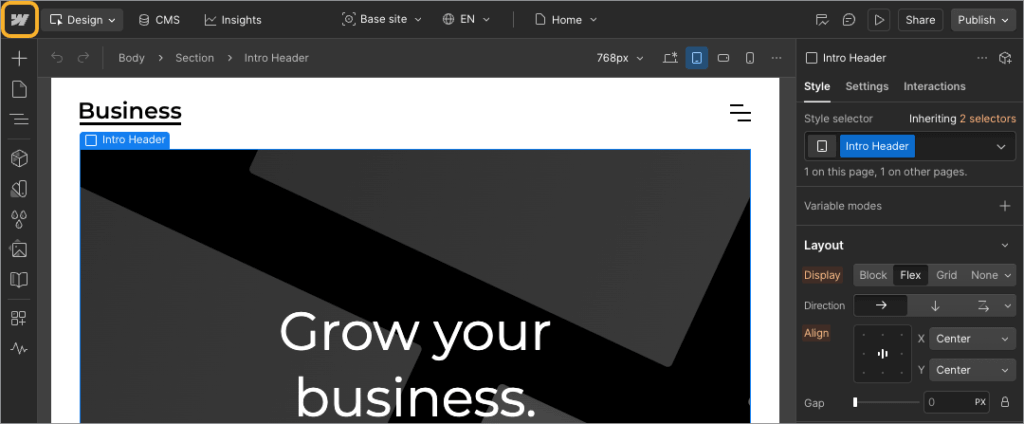
Here is where Webflow genuinely shines. The platform comes loaded with SEO essentials built directly into the interface — no plugins required.
Clean Semantic HTML by Default
Webflow outputs clean, semantic HTML5 with proper heading hierarchy, minimal render-blocking JavaScript, and automatic SSL. This matters because Google’s crawlers need to read and understand your content efficiently. When your site is built on bloated, plugin-heavy code, crawlers waste their budget. Webflow removes that problem by design.
Unlike WordPress themes that often inject unnecessary CSS and JavaScript, Webflow generates lightweight, structured code that search engines can digest without friction.
Full Control Over On-Page SEO Settings
Webflow gives you direct access to every on-page SEO element that matters:
- Title tags and meta descriptions — Set unique, keyword-optimized titles and descriptions on every static page and CMS Collection page
- Heading hierarchy (H1–H6) — One H1 per page supported by structured H2 and H3 subheadings
- Image alt text — Add descriptive alt text to every image for accessibility and image SEO
- Custom URL slugs — Clean, readable, keyword-friendly URLs across all pages
- Open Graph tags — Full control over how your pages appear when shared on social platforms
- Canonical tags — Prevent duplicate content issues with page-level canonical tag settings
These are not workarounds or third-party integrations. They live inside Webflow’s native Page Settings and Designer panels.
Automatic XML Sitemaps and Robots.txt
Webflow automatically generates a sitemap.xml for your site and gives you access to a built-in robots.txt editor. You can control which pages search engines crawl, disable subdomain indexing to prevent duplicate content, and submit your sitemap directly to Google Search Console in just a few steps.
This level of technical SEO control used to require SEO plugins on other platforms. Webflow bakes it in.
301 Redirects
One of the most underrated Webflow SEO features is built-in 301 redirect management. If you update a URL or restructure your site, Webflow automatically prompts you to create a redirect from the old URL to the new one. This protects your link equity and prevents 404 errors — two things that directly impact your rankings.
On WordPress, this requires a plugin like Redirection. On Webflow, it is a native feature that works right out of the box.
Global CDN and SSL by Default
All Webflow sites are hosted on a fast global CDN with SSL enabled by default on every plan. This means your pages load quickly for visitors anywhere in the world, and HTTPS is live from day one — both of which are ranking factors that Google takes seriously.
Webflow sites consistently score 90+ on PageSpeed when properly configured, with agencies reporting 95–100 PageSpeed scores on client projects.
Webflow’s AI-Powered SEO Features in 2026
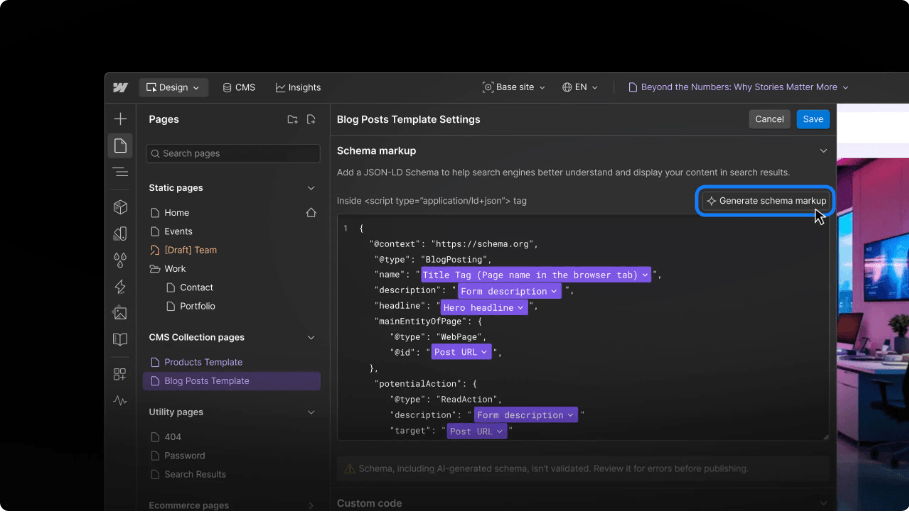
This is where things get genuinely exciting for marketers.
In 2025 and early 2026, Webflow rolled out a suite of AI-powered SEO and AEO (Answer Engine Optimization) tools that make it even easier to optimize your site at scale.
Here is what the AI now does inside Webflow:
- Sitewide SEO audits — Run a full audit across your entire site to identify missing meta titles, meta descriptions, alt text, and schema markup from one dashboard
- Instant AI-generated fixes — Instead of just flagging issues, Webflow AI suggests specific, content-aware fixes you can accept or edit before publishing
- Automatic schema markup — Webflow AI evaluates your content and recommends the most relevant schema type, then writes the JSON-LD for you — no custom code needed
- Alt text generation — For images without alt text, Webflow AI generates accurate, descriptive alternatives automatically
- AEO optimization — Tools designed specifically to help your content get cited by AI answer engines like ChatGPT and Google’s AI Overviews
These features are available on paid site and workspace plans. They represent a significant leap forward — especially for marketing teams managing large Webflow sites without dedicated SEO developers.
Webflow Technical SEO
Webflow Technical SEO is solid. Here is a summary of what you have full control over:
- Sitemap.xml — Auto-generated and updatable from Project Settings
- Robots.txt — Fully editable to block or allow specific crawl paths
- 301 redirects — Manageable from the Hosting tab or auto-triggered on URL changes
- Canonical tags — Set at the page level to prevent duplicate content
- SSL/HTTPS — Enabled by default on all Webflow hosting plans
- Lazy loading — Native support to improve LCP (Largest Contentful Paint) scores
- Image compression — Webflow automatically serves images in modern WebP format
- Structured data / Schema — Add via custom code or use Webflow’s new native schema tool
- Open Graph and Twitter Card tags — Configurable per page
One important technical note: Webflow’s hosting runs on a global CDN, which removes the need for caching plugins, speed optimization plugins, or complex server configuration — tasks that consume significant time and expertise on WordPress.
Webflow On-Page SEO Checklist
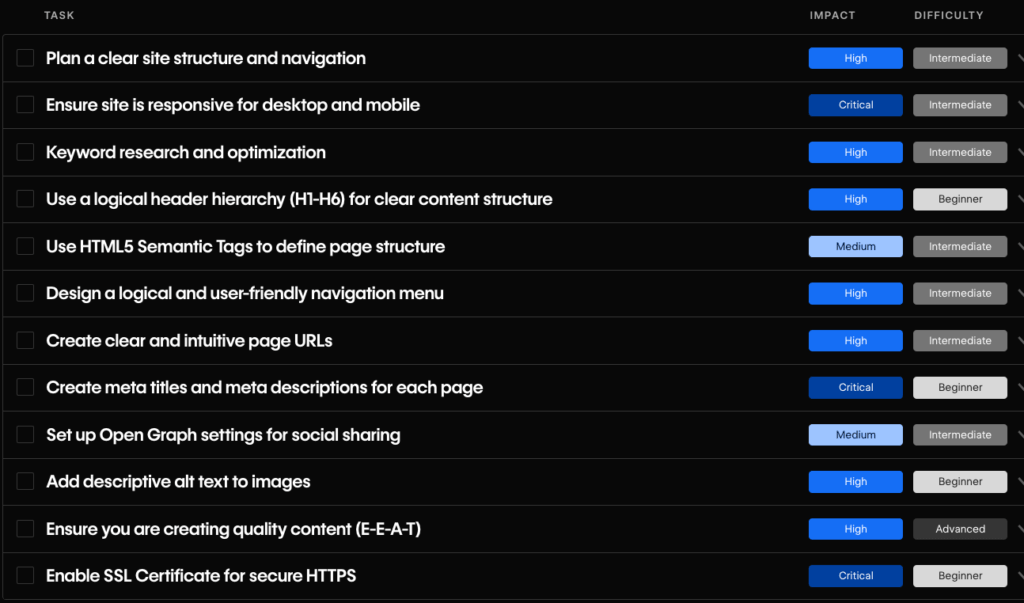
Getting on-page SEO right in Webflow does not require any special tools. It requires discipline and a structured approach. Here is what to check on every page:
Page Structure
- tag <h1> per page that includes the primary keyword
- Logical H2 and H3 hierarchy that supports content flow
- Short, descriptive, keyword-rich URLs (e.g., /blog/webflow-seo-guide)
- Semantic HTML5 elements (, , , etc.) applied via element settings
Metadata
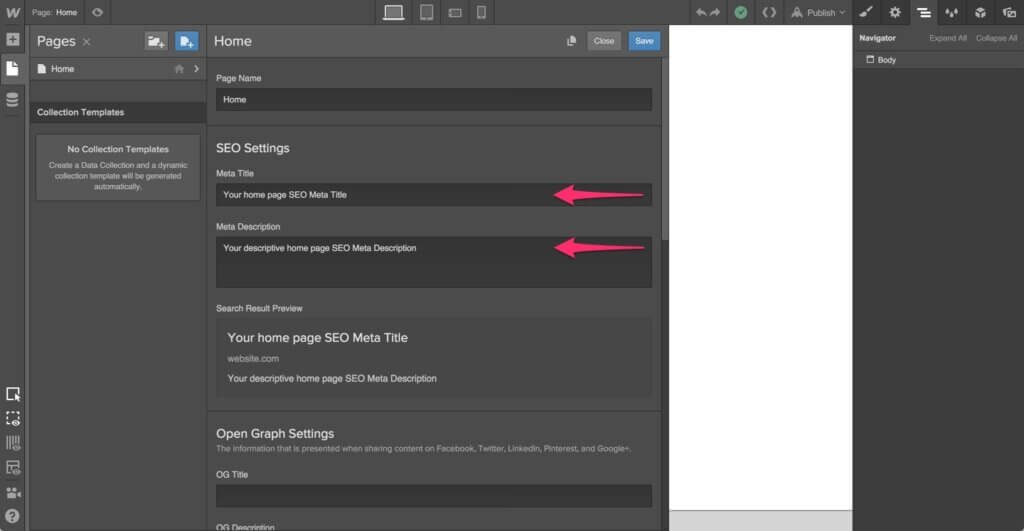
- Unique title tag under 60 characters that includes the target keyword
- Unique meta description between 150–160 characters with a natural call-to-action
- Open Graph title, description, and image set for all key pages
Content and Media
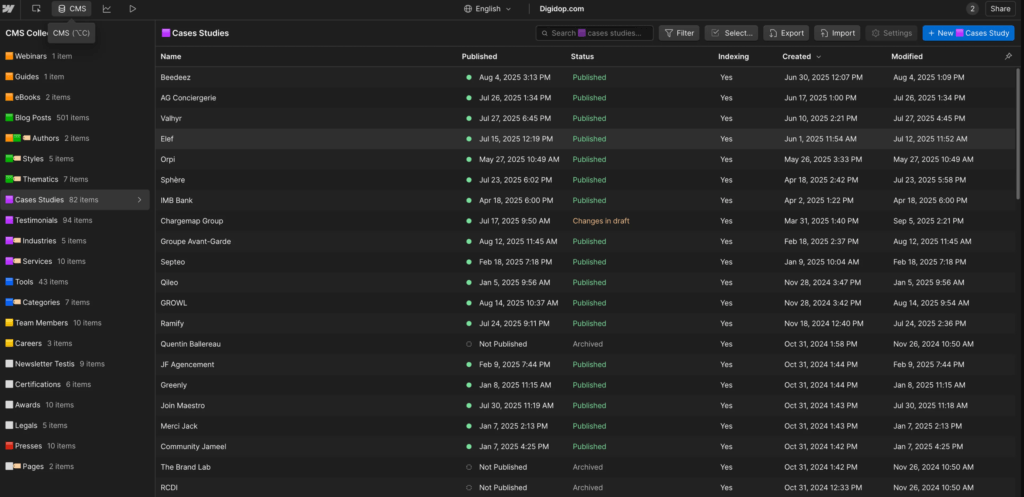
- Descriptive alt text on every image
- Compressed images under 180KB in WebP format
- Internal links with meaningful anchor text (not “click here”)
- External links set to open in a new tab
CMS Pages
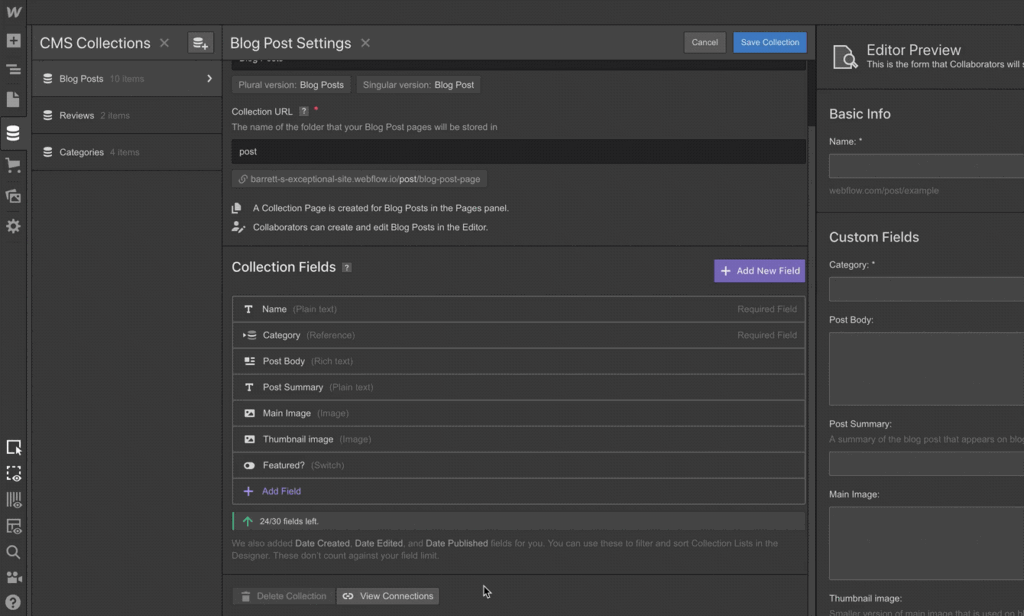
- Dynamic meta titles and descriptions templated from CMS fields
- Collection page URLs are structured cleanly (e.g., /blog/[post-slug])
- Breadcrumb navigation to help Google understand the site hierarchy
Webflow SEO Pros and Cons
Here is a straightforward breakdown:
| Factor | Webflow SEO Assessment |
|---|---|
| Page speed | Excellent — global CDN, WebP images, clean code |
| Technical SEO | Strong — sitemap, redirects, SSL, canonical tags built in |
| On-page control | Full control over all standard on-page elements |
| Clean code output | Semantic HTML with no plugin bloat |
| Schema markup | Now native with AI suggestions in 2026 |
| AEO / AI search | New AI tools specifically for answer engine optimization |
| Blogging at scale | CMS capped at 10,000 items (20,000 with add-ons) |
| Plugin ecosystem | Smaller than WordPress — fewer ready-made SEO tools |
| Programmatic SEO | Complex at a very large scale without external databases |
| International SEO | Localization is now native, but advanced hreflang setups need care |
| Learning curve | Steeper than Wix or Squarespace for non-designers |
| E-commerce SEO | Not as mature as Shopify for large stores |
How Webflow Stacks Up Against WordPress and Squarespace
This is the comparison most people actually want to see. Let’s be direct:
| SEO Capability | Webflow | WordPress | Squarespace |
|---|---|---|---|
| Built-in SEO controls | Native | Plugin-dependent (Yoast, RankMath) | Native (limited) |
| Page speed | Excellent | Hosting/plugin dependent | Good |
| Clean code output | Very clean | Theme-dependent | Clean |
| Redirects | Built-in | Requires plugin | Limited |
| Schema markup | Native + AI | Via plugins | Basic only |
| CMS scalability | 10k–20k items | Unlimited | Moderate |
| Plugin ecosystem | Growing | Massive | Minimal |
| Blogging tools | Good | Excellent | Good |
| International SEO | Native localization | Plugins available | Basic |
| AI SEO tools | Native in 2026 | Third-party only | Basic |
| Maintenance overhead | Low | High | Very low |
The takeaway: Webflow outperforms WordPress on speed, code quality, and maintenance simplicity. WordPress still wins for unlimited scale, deep plugin customization, and content-heavy publishing workflows. Squarespace is easier to use for non-technical teams but offers less granular SEO control.
For most marketing sites, SaaS companies, agencies, and service businesses, Webflow gives you everything you need to rank well — without the technical debt of a WordPress installation.
When You Should Choose Webflow for SEO
Webflow is an excellent fit if:
- You are building a marketing website, SaaS site, portfolio, or agency site
- Your team wants to manage SEO without relying on developers or plugins
- Page speed and Core Web Vitals performance are priorities
- You want clean code that search engines crawl efficiently
- You are optimizing for AI search (AEO) alongside traditional SEO
- Your content library stays under 10,000–20,000 CMS items
Webflow genuinely excels here. The platform is purpose-built for design-forward, performance-focused sites where branding and SEO need to coexist.
When You Should Not Choose Webflow for SEO
Be honest with yourself if:
- You are running a large e-commerce store with thousands of product pages (Shopify is better suited)
- You need programmatic SEO at a massive scale — think directory sites with 50,000+ pages
- Your team has zero design background and expects a truly drag-and-drop experience
- You need complex backend logic, custom user authentication, or app-like functionality
- Your business requires very advanced multilingual setups with complex regional structures
These are not dealbreakers for most businesses — they are use-case-specific scenarios. If you fall into one of those categories, Webflow may still be part of your stack, just not the sole platform.
Webflow SEO Best Practices for 2026
Here are the habits that separate Webflow sites that rank from those that do not:
- Plan your CMS structure before you build — A poorly structured CMS leads to messy URL patterns and weak content hierarchies. Map out your collections first.
- Use one H1 per page — Make it descriptive, keyword-rich, and genuinely representative of the page content.
- Write unique metadata for every page — Never leave title tags or meta descriptions blank or auto-generated from page names. Write them intentionally.
- Set up Google Search Console early — Add your domain, paste the verification code in Project Settings > SEO tab, and submit your sitemap. Monitor crawl coverage weekly.
- Optimize images before upload — Compress to under 180KB, use WebP format, and name files descriptively (e.g., webflow-seo-checklist.webp instead of img001.webp).
- Add schema markup where it matters — Use Webflow’s native schema tool for blog posts, FAQs, services, and local business pages. This improves your chances of appearing in rich snippets.
- Build internal links intentionally — Every blog post and service page should link to at least 2–3 relevant internal pages with descriptive anchor text.
- Use Webflow’s AI audit tool — Run a sitewide audit regularly to catch missing alt text, meta fields, or schema gaps before they compound.
- Minify and optimize assets — Enable HTML, CSS, and JS minification in the Hosting tab. Remove unused interactions and custom code that adds page weight.
- Disable subdomain indexing — Prevent Webflow’s default subdomain from being indexed alongside your custom domain in Project Settings > SEO.
How Webflow Handles Blogging and Content SEO
Content is still the foundation of organic growth, and Webflow’s CMS handles blogging well — with some important caveats to understand.
Webflow’s CMS Collections let you build a structured blog with full control over post layout, metadata, URL structure, and schema markup. Each blog post gets its own templated SEO fields — so you can dynamically pull the article title into the meta title and the post excerpt into the meta description across your entire blog without setting each one manually. This is a significant time saver for sites with dozens or hundreds of posts.
You can also set up proper breadcrumb navigation for blog categories, tags, and category archive pages, and author pages — all of which help Google understand the structure of your content and index it more efficiently.
Where blogging on Webflow gets limited:
- The CMS caps at 10,000 items by default (expandable to 20,000 with certain plans)
- There is no built-in commenting system — you need a third-party tool like Disqus
- Content editing for non-designers can feel less intuitive than WordPress’s Gutenberg editor
- You cannot create unlimited custom post types the way WordPress allows with custom post types
For most businesses publishing a few hundred posts per year, none of these limitations is a problem. If you are running a media publication or a news site that needs to publish 20+ articles per day indefinitely, WordPress’s unlimited database is more practical.
Is Webflow good for Programmatic SEO?
Programmatic SEO — the practice of generating large numbers of landing pages from a structured data source — is something Webflow can handle, but with boundaries.
Using Webflow’s CMS Collections combined with external tools like Airtable, Make (formerly Integromat), or Zapier, teams have built programmatic SEO campaigns on Webflow that generate city-specific landing pages, comparison pages, and use-case pages at scale.
For example, a SaaS company could create a collection of “[Tool] vs [Competitor]” pages or “Best [Software] for [Industry]” pages populated from a structured spreadsheet.
The caveat is the 10,000–20,000 item cap. If your programmatic SEO strategy requires generating 50,000+ pages — think job boards, directories, or real estate listings — Webflow’s native CMS is not built for that. In those cases, a headless CMS architecture or WordPress with a custom database is better suited.
For standard programmatic SEO campaigns in the range of 500–5,000 targeted landing pages, Webflow handles it well — and the clean code output means those pages load fast and get indexed efficiently.
Is Webflow good for Local SEO?
If you are a local business or managing local SEO for your business, Webflow covers the technical requirements of local SEO without any major issues.
You can easily add:
- LocalBusiness schema markup — Use Webflow’s custom code panel or the native schema tool to add structured data that tells Google your business name, address, phone number, hours, and service area
- Location-specific landing pages — Build CMS-powered location pages with unique content for each city or region you serve
- NAP consistency — Ensure your Name, Address, and Phone number are embedded in clean HTML text (not images) so Google and directories can read it accurately
- Google Maps embeds — Embed a Google Map on your contact or location pages with a simple embed code block
- Breadcrumb schema — Add breadcrumb structured data to reinforce your site hierarchy for local search
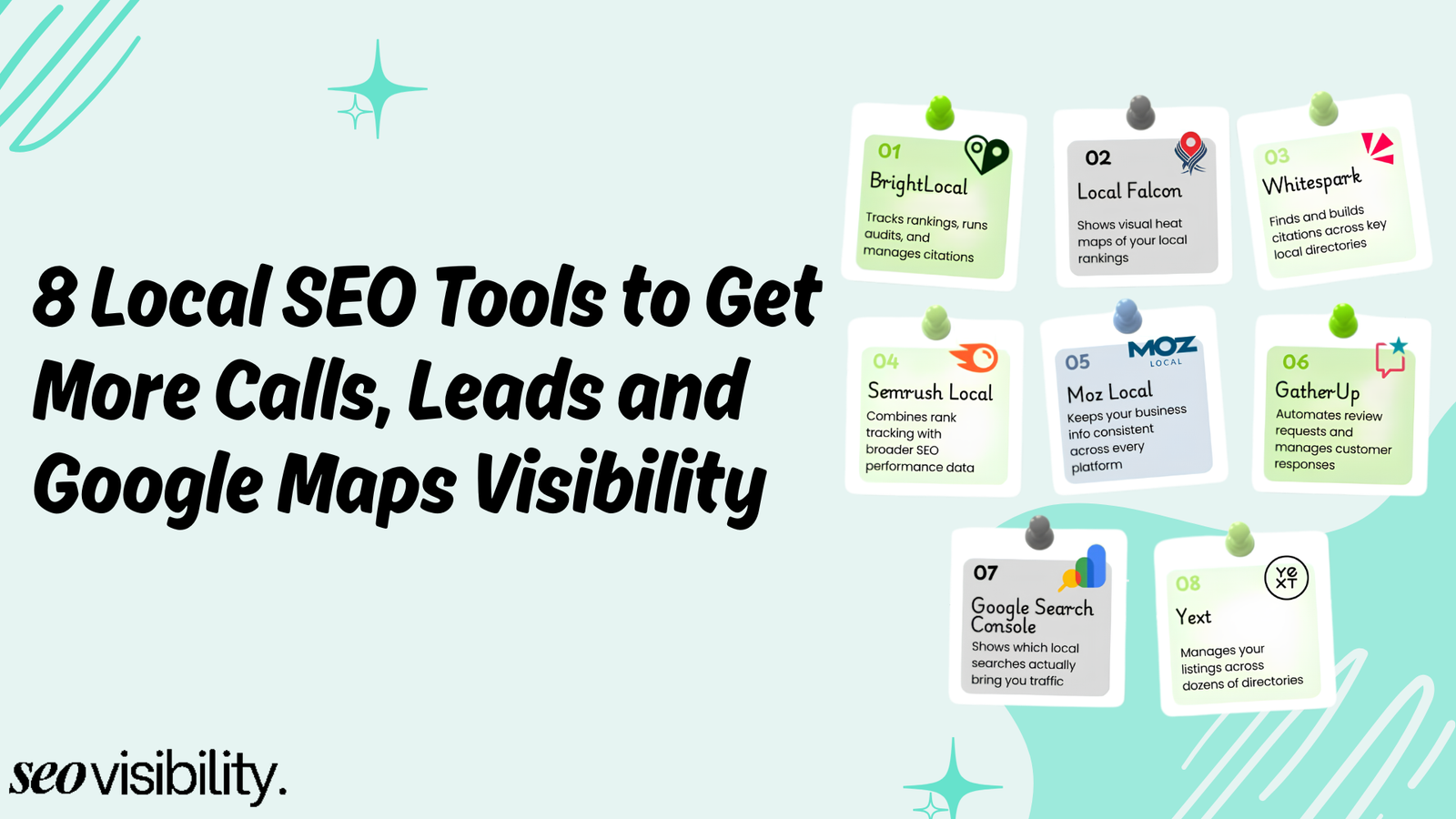
Webflow does not have a built-in Google Business Profile integration, but that is not a platform limitation — GBP management happens outside your website regardless of what CMS you use.
Is Webflow good for E-Commerce SEO?
Webflow’s e-commerce functionality has improved, but it remains a secondary strength compared to platforms like Shopify.
For small online stores selling fewer than 100 products, Webflow e-commerce works perfectly fine for SEO. You get full control over product page meta titles, meta descriptions, URLs, alt text, and structured data. Product pages load fast on Webflow’s CDN, which is a genuine advantage over slower Shopify themes.
Where Webflow e-commerce falls behind Shopify for SEO:
- No native review schema — Customer reviews with star ratings in search results require custom code or third-party apps
- Limited faceted navigation control — Large product catalogs with filters can create crawl issues that require manual handling
- Fewer app integrations — Shopify’s app ecosystem for e-commerce SEO (product feed optimization, review aggregation, etc.) is significantly richer
- No native subscription/recurring products — These require Memberstack or similar add-ons, adding complexity
If e-commerce is your primary business model with hundreds of SKUs and complex catalog structures, Shopify is still the stronger SEO platform. If e-commerce is a secondary feature on an otherwise content- or service-focused site, Webflow handles it well.
Webflow Vs WordPress
This comparison comes up constantly, and the honest answer is that neither platform wins across every category — it depends on what you are building.
WordPress still leads in raw flexibility. Its plugin ecosystem (Yoast SEO, RankMath, Schema Pro, Link Whisper) gives advanced SEO practitioners granular control over almost everything. WordPress also has no content item limits, which matters for publishers and large sites.
But WordPress’s SEO advantage comes with hidden costs. Plugin conflicts, hosting quality variance, update failures, and bloated themes regularly create technical SEO problems that require developer time to fix. A poorly maintained WordPress site is technically far worse for SEO than a well-built Webflow site.
Webflow, on the other hand, removes that maintenance burden entirely. The SEO foundation is consistent by default — fast, clean, structured. For a marketing team that does not have a dedicated WordPress developer, Webflow is the more reliable long-term SEO platform simply because it does not degrade over time the way a plugin-heavy WordPress site can.
The bottom line: WordPress is better for teams with developer resources who need maximum flexibility. Webflow is better for lean marketing teams who want strong SEO performance without ongoing technical maintenance.
Common Webflow SEO Mistakes to Avoid
After auditing dozens of Webflow sites, the same mistakes come up repeatedly:
- Leaving the Webflow subdomain indexed — If you launch a custom domain without disabling indexing on the .webflow.io subdomain, you create duplicate content that Google penalizes
- Not setting 301 redirects after URL changes — Even though Webflow prompts you, many users skip this step and break their link equity
- Using generic CMS URL structures — A URL like /blog/cms-item-1 hurts SEO. Use descriptive slugs like /blog/webflow-seo-guide
- Skipping Open Graph settings — Without OG tags, social shares show broken previews, reducing click-through rates from social traffic
- Publishing pages with duplicate meta titles — Especially common on CMS Collection pages, where the template is not properly set up
- Forgetting to submit the sitemap — Webflow auto-generates the sitemap, but you still need to submit it manually in Google Search Console
- Uploading uncompressed images — Large PNG files dramatically slow down page load speeds and hurt Core Web Vitals scores
- Ignoring mobile responsiveness — Webflow makes mobile design easy, but it is not automatic. Always review mobile breakpoints before publishing
Avoiding these eight mistakes alone puts your Webflow site ahead of most competitors.
Is Webflow good for AI Search in 2026?
Search is changing faster than most people realize. AI Overviews in Google, ChatGPT search, Perplexity, and other answer engines are now significant sources of organic traffic — and they reward content that is structured, authoritative, and genuinely helpful.
Webflow is particularly well-positioned for AEO. The platform’s clean code, structured content, and fast load times make it easier for AI systems to understand and reference your pages.
Combined with Webflow’s new native AEO tools — which help you optimize for answer engine discovery alongside traditional SEO — Webflow sites that focus on topical authority, clear content structure, and direct answers to user questions are well set up to win in both traditional and AI-powered search results.
How to Get Your Webflow Site Ranked Higher in Google?
Webflow gives you a seriously powerful SEO foundation in 2026. The built-in tools are excellent, the platform is fast and clean, and the new AI features remove much of the manual overhead that used to hold marketers back. But the platform alone will not rank your site — strategy, execution, and ongoing optimization are what actually move the needle.



![How Much Does an SEO Expert Cost in 2026 [SEO Pricing]](https://seovisibility.co/wp-content/uploads/2026/01/how-much-does-an-seo-expert-cost.png)