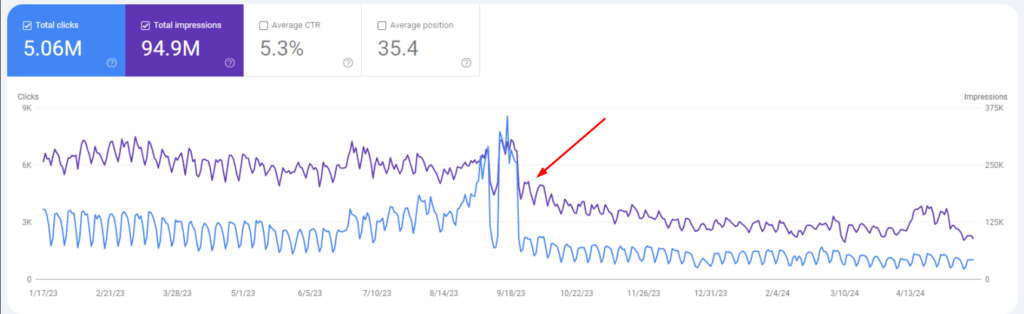
You wake up, check your analytics, and see that your traffic has dropped. Traffic is down 60% or maybe even 80%. Pages that ranked on page one for years have completely disappeared from the search results. You start to wonder if something is wrong, if Google made a mistake, or if your site is finished for good.
Take a breath. You’re probably facing a Google penalty.
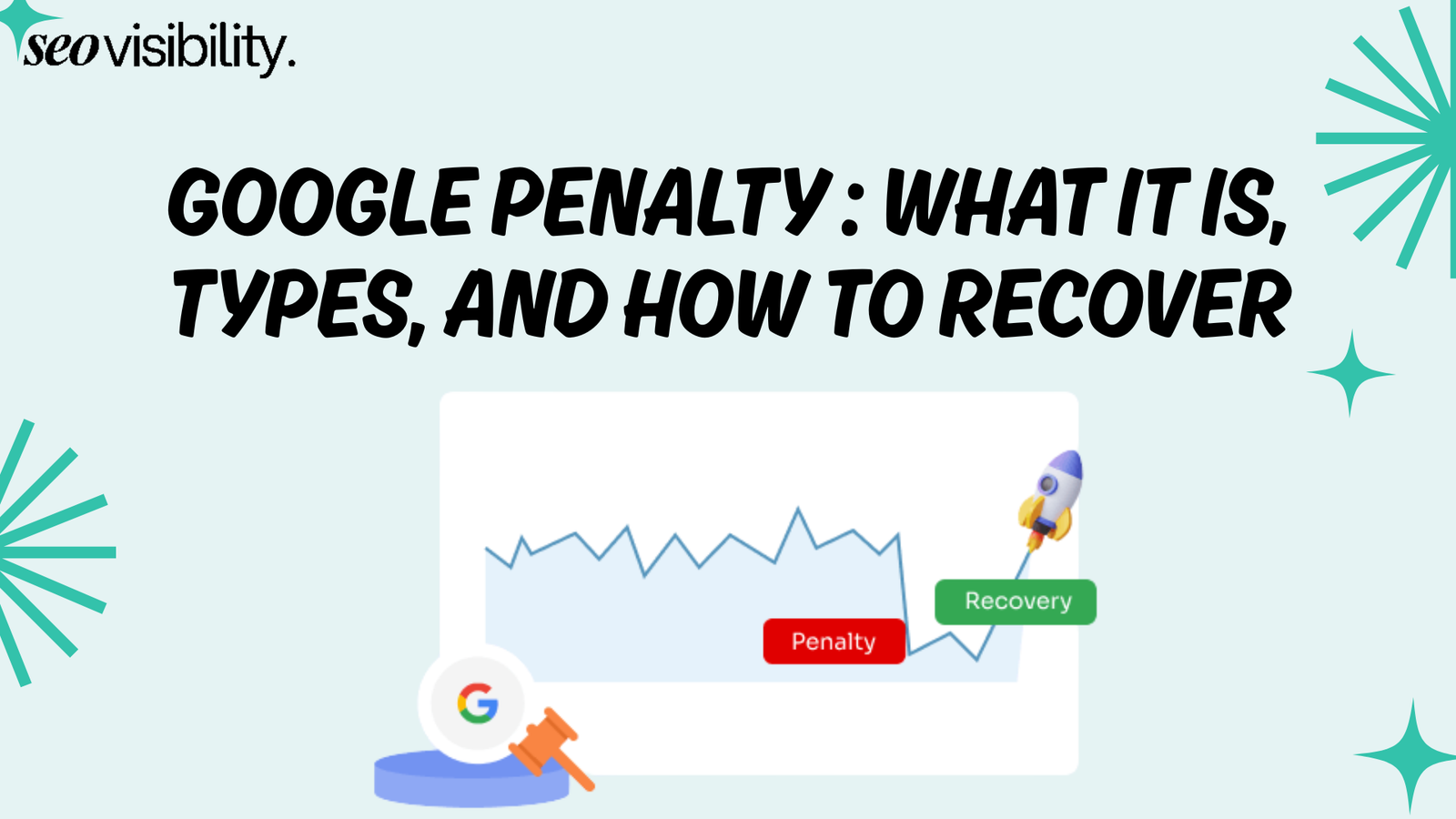
So what is a Google penalty? It occurs when Google takes action against your website for breaking its guidelines. The result is a drop in your rankings, a loss of organic traffic, and, in the worst cases, your pages might get completely removed from Google’s indexing. This is one of the most stressful situations for a website owner, especially if your business relies on search traffic.
This post will explain what happened to your site, help you identify which type of penalty you are facing, and guide you through the step-by-step process for recovering from a Google penalty.
What is a Google Penalty?
A Google penalty is an action against your website that causes it to fall in search rankings or, in more serious cases, get removed from Google’s index entirely.
It occurs when your site breaks Google’s Search Essentials, which were previously called Webmaster Guidelines. This can happen due to low-quality content, manipulative link building, or misleading technical tactics.
When Google decides your site has crossed a line, the consequences range from mild to devastating:
- Lower rankings for some or all of your pages•
- Significant drops in organic traffic — sometimes 50-90% overnight
- Complete removal of your site from search results (in extreme cases)
The penalty can hit a single page, a specific section, a subdomain, or your entire domain. It depends on the severity and scope of the violation. A handful of spammy links might only affect a few pages. But site-wide thin content or aggressive cloaking can get your whole domain deindexed.
How does Google catch these violations? Two ways. First, there’s SpamBrain — Google’s AI-based spam detection system that automatically scans the web for spammy behavior.
It’s considered remarkably good at identifying manipulative links, auto-generated content, and other forms of search spam. Second, some human reviewers manually inspect sites that get flagged for suspicious activity.
The good news is that manual penalties are relatively rare. Less than 1% of websites receive a manual action.
But algorithmic adjustments affect far more sites, and many website owners don’t even realize they’ve been hit until they check their traffic numbers and see a cliff.
Google’s spam policies keep evolving, too. The March 2024 core update introduced new policies targeting scaled content abuse, expired domain abuse, and site reputation abuse.
And the March 2026 spam update, which is rolling out right now, continues this crackdown with even tighter enforcement. If your site got hit recently, that update might be the reason.
Types of Google Penalties
There are two main types — manual actions (where a human reviewer at Google flags your site) and algorithmic penalties (where Google’s automated systems push your rankings down). Both are painful.
But here’s the thing: recovery is possible. Thousands of websites have come back from Google penalties, and yours can too.
1. Manual Spam Actions (Manual Penalties)
Manual spam actions happen when a human reviewer at Google examines your site and decides it violates their spam policies. You’ll get a notification in Google Search Console under “Security & Manual Actions.” The notification tells you exactly what the violation is, which is actually helpful — at least you know what you’re dealing with instead of guessing.
To recover from a manual action, you have to fix the issue and then submit a reconsideration request through Search Console. Google won’t lift the penalty until you prove you’ve cleaned things up. And they mean it — vague promises don’t cut it.
Manual actions can be site-wide (affecting your entire domain) or partial (targeting specific pages, directories, or sections of your site). Here are the most common types:
Unnatural links to your site — You have backlinks that look bought, traded, or manipulated. This is the most common manual action by far, and it’s what most site owners face when they get penalized.
Unnatural links from your site — You’re selling links to other websites or running excessive link exchanges that violate Google’s guidelines.
Thin content with little value — Your pages have shallow, unhelpful, or auto-generated content that doesn’t serve users. Doorway pages fall into this category too.
Pure spam — Your site uses aggressive spam techniques like auto-generated gibberish, scraping content from other sites, or creating pages stuffed with nonsense.
User-generated spam — Spammy comments, forum posts, or profile pages on your site that you haven’t moderated or cleaned up.
Cloaking or sneaky redirects — Showing Google different content than what real visitors see, or redirecting users to unexpected pages they didn’t click on.
Hidden text or keyword stuffing — Hiding keywords on the page (same-color text on background, tiny font sizes) or cramming keywords so densely that the text becomes unreadable.
Spammy structured data — Misusing schema markup to show fake reviews, fabricated ratings, or misleading information in search results.
Scaled content abuse — Publishing mass AI-generated or auto-generated content at scale with no real value to users. This was added as a specific policy in 2024.
Site reputation abuse — Hosting third-party, low-quality content (sometimes called parasite SEO) to exploit your domain’s authority for someone else’s benefit.
Hacked content — Someone compromised your site and injected spammy pages, links, or redirects without your knowledge. This isn’t your fault, but you’re still responsible for fixing it.
2. Algorithmic Penalties (Google Penguin and Panda)
Algorithmic penalties are trickier because you don’t get any notification. These are caused by Google’s automated ranking systems — SpamBrain, core updates, spam updates, helpful content signals, and other algorithms working behind the scenes.
There’s no message in Search Console telling you what went wrong. You have to figure it out yourself, which is why algorithmic penalties are so frustrating for site owners.
Here are the signs you’ve been hit by an algorithmic penalty:
- A sudden, significant drop in organic traffic — often 30% or more
- Ranking losses across multiple keywords at the same time
- The timing of your traffic drop lines up with a known Google update
- Multiple pages across different sections of your site lose rankings, not just one or two isolated pages
Common triggers include low-quality content, a spammy backlink profile, pages with thin content that don’t help anyone, poor user experience, and mass-published AI content that wasn’t properly edited or fact-checked. Sometimes it’s a combination of several issues building up over time.
The key difference from manual penalties: there’s no reconsideration request to submit. Recovery happens automatically once you fix the underlying issues and Google recrawls and reassesses your site. But that can take weeks to months, depending on how severe the problems are and how long it takes Google to process the changes.
Figuring out which type of penalty you’re dealing with is the first and most important step toward recovery. Here’s how to do it:
- Check Google Search Console. Go to Security & Manual Actions → Manual Actions. If there’s a notification there, you have a manual penalty. It will tell you exactly what the issue is and which pages or sections are affected.
- If it says “No issues detected,” it’s likely algorithmic. Cross-reference the date your traffic dropped with known Google update dates. Google’s Search Status Dashboard tracks all update rollouts in real time, so you can match the timing.
- Analyze the pattern of the drop. Check your analytics carefully. Was the drop sudden and dramatic — like falling off a cliff on a specific date? That’s typical of an algorithm update hitting your site. Or was it a slow bleed over weeks or months? That usually points to a gradual content quality decline or an accumulation of bad links.
How to Recover from a Google Penalty (Step-by-Step)
Now for the part you’ve been waiting for — the actual Google penalty recovery process. I’ve walked dozens of site owners through these steps over the years, and this is what works every time.
A thorough, systematic cleanup that shows Google your site is worth ranking again. Successful Google penalty recovery comes down to doing each of these steps completely — not halfway.
Step 1: Confirm the Penalty Type
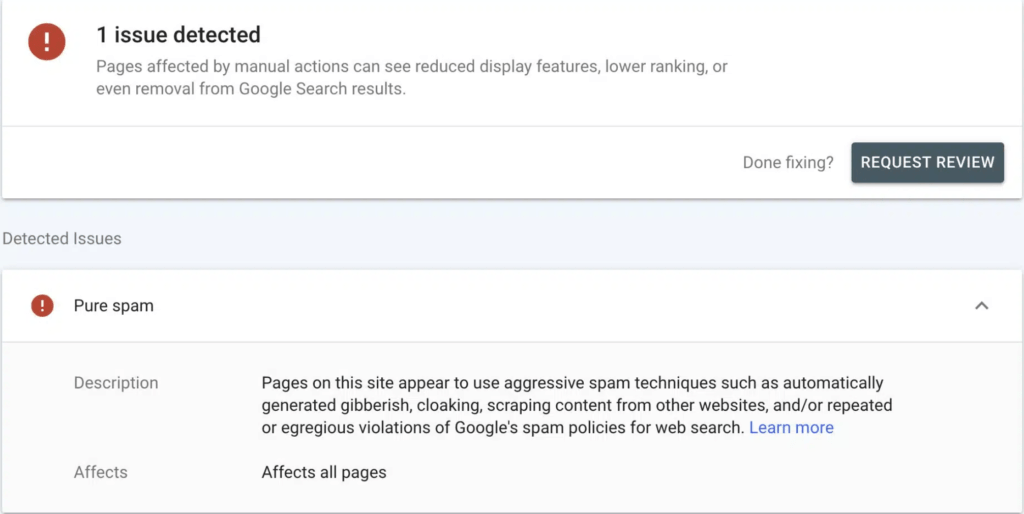
Before you fix anything, confirm what you’re dealing with. Don’t guess — wrong assumptions lead to wasted effort.
- Log in to Google Search Console for the affected property
- Go to Security & Manual Actions → Manual Actions
- If there’s a message, read it carefully — it explains the violation and tells you which parts of your site are affected
- If there’s no manual action, open Google Analytics and compare your traffic drop dates against known Google update rollouts
This step might seem obvious, but you’d be surprised how many people skip it and start making random changes. Fixing link issues when the real problem is thin content — or vice versa — wastes precious time and can actually make things worse.
Step 2: Audit Your Backlink Profile
Bad backlinks are one of the most common causes of Google penalties, both manual and algorithmic. You need a complete picture of what your backlink profile looks like before you can fix it.
- Export your full backlink profile using tools like Ahrefs, SEMrush, or Google Search Console’s Links report. Use multiple sources to get the most complete data.
- Look for red flags: spammy links from low-quality directories, paid links from sponsored post networks, PBN (private blog network) links, irrelevant foreign-language links, and links from hacked or compromised websites
- Pay special attention to links with exact-match anchor text or commercial keywords — these scream manipulation to Google. If 40% of your anchors are “best cheap widgets” or “buy widgets online,” that’s a problem.
- Document everything you find in a spreadsheet with columns for the linking URL, anchor text, spam indicators, and status. You’ll need this documentation later for your reconsideration request.
Step 3: Remove Toxic Backlinks
Once you’ve identified the bad links, it’s time to get rid of them. Google expects you to make a genuine effort to remove them manually before resorting to the disavow tool.
- Reach out to webmasters and ask them to remove the links. Yes, this is tedious, and most won’t respond. Do it anyway — Google wants to see you tried.
- Keep a detailed log of every outreach attempt — who you contacted, their email address, the date you reached out, and what response you got (or didn’t get). This log becomes evidence in your reconsideration request.
- For links you can’t get removed after a reasonable effort, create a disavow file listing those domains or specific URLs
- Submit the disavow file through the Google Disavow Tool in Search Console
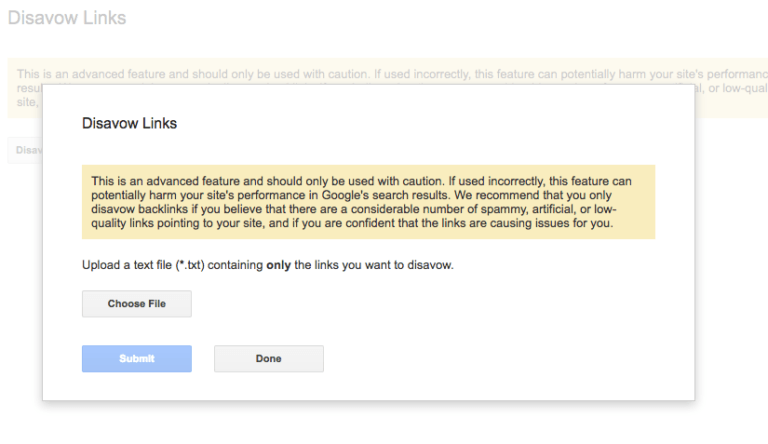
Caution: don’t over-disavow. Only target links that are clearly manipulative, spammy, or part of a paid scheme. Disavowing legitimate low-authority links — like links from small but real blogs — can actually hurt your link profile rather than help it.
Step 4: Fix Content Issues
Content problems are a huge trigger for penalties, especially after Google’s recent crackdowns on low-quality and AI-generated content. If your penalty is content-related, this is where you’ll spend most of your time.
- Audit your site for thin pages — anything with little or no unique value to visitors. Pages with only 100-200 words of generic text are prime candidates.
- Remove or consolidate duplicate content. If you have five pages saying the same thing with slightly different keywords, merge them into one comprehensive, genuinely useful page.
- Rewrite any pages that were obviously created just to rank for a keyword rather than to help a real person. You know the ones — they answer a question in the title but pad the content with filler.
- If you published AI-generated content without proper human editing, go back and rewrite it. Add original insights, personal experience, real expertise, and information that can’t be found by copying competitors.
- Ask yourself honestly about every page: does this genuinely help the visitor? Would I be proud to show this to a client or colleague? If the answer is no, fix it or remove it. There’s no shortcut here.
Step 5: Resolve Technical Problems
Technical violations are less common than link or content issues, but they can absolutely trigger penalties. Run through this checklist:
- Cloaking — showing Google different content than what your visitors actually see. This includes IP-based cloaking, user-agent cloaking, and JavaScript-rendered content that only appears for Googlebot.
- Hidden text or keyword stuffing buried in your page code — white text on white backgrounds, text pushed off-screen with CSS, or keyword lists crammed into alt tags
- Spammy or misleading structured data and schema markup — fake review stars, fabricated product availability, or event markup for pages that aren’t events
- Sneaky redirects that send users to pages they didn’t click on, or that behave differently for search engine bots than for regular visitors
- Hacked content — check for injected pages, hidden links, Japanese keyword hacks, or malware. If your site has been compromised, secure it immediately by updating passwords, patching vulnerabilities, and cleaning all infected files.
- Understand core web vitals standards. Poor page speed, layout shifts, and slow interactivity won’t cause a penalty on their own, but solid technical performance supports your recovery.
Step 6: Submit a Reconsideration Request (Manual Penalties Only)
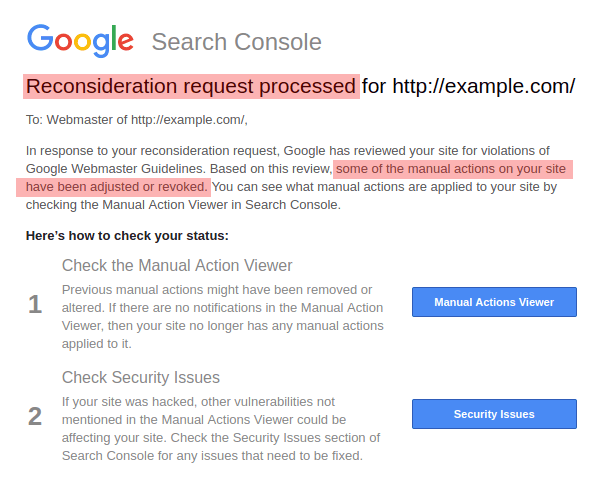
This step only applies if you have a manual action in Search Console. If you’re dealing with an algorithmic penalty, skip ahead to Step 7 — there’s no reconsideration request for algorithmic issues.
Only submit your reconsideration request after you’ve fixed all the issues. Submitting too early is one of the most common mistakes I see, and it almost always results in rejection, which means you have to start the waiting period all over again.
- In Google Search Console, go to Manual Actions and click “Request Review.”
- Write a clear, honest explanation covering three things: what went wrong, what specific steps you took to fix it, and what processes you’ve put in place to prevent it from happening again
- Include evidence — your outreach logs showing link removal attempts, details about your disavow file, before-and-after screenshots of content changes, and any documentation of technical fixes
- Be specific and take responsibility. Vague statements like “we fixed everything” or blaming a previous SEO agency will get your request rejected. Google reviewers want to see that you understand what happened and took real action.
- Google typically responds within 2-4 weeks. Check your Search Console messages regularly during this time.
- If your request is rejected, don’t panic. Review their feedback carefully, make additional fixes addressing whatever they flagged, and resubmit. Some sites need two or three rounds before the penalty is lifted. Persistence pays off.
Step 7: Monitor and Rebuild
Recovery isn’t instant. Even after you’ve done everything right, it takes time for Google to recrawl your site, reassess the changes, and restore your rankings. Here’s how to handle the waiting period:
- Track your rankings and organic traffic daily after making changes. Use Google Search Console’s Performance report to spot early signs of recovery — impressions usually come back before clicks.
- For algorithmic penalties, recovery depends on Google recrawling your pages and the timing of the next relevant update cycle. Sometimes you’re waiting for the next core update or spam update to see real movement.
- Manual penalties can be lifted within weeks once your reconsideration request is approved. You’ll get a notification in Search Console confirming the penalty has been removed.
- Complex cases — especially those involving both link issues and content problems — may take 3-6 months or longer to fully recover. Some sites recover in stages, with rankings returning gradually over multiple update cycles.
- Use this time to build genuine authority. Create truly helpful content that your audience actually needs. Earn natural backlinks by publishing things worth linking to. Improve your overall user experience.
- Keep monitoring your backlink profile regularly — at least monthly — so you catch any new toxic links before they pile up and cause problems again
How Long Does Google Penalty Recovery Take?
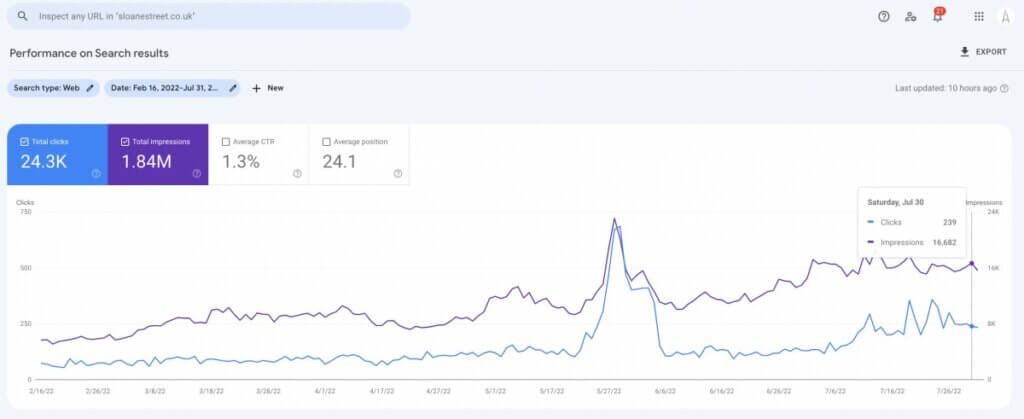
This is the most common question everyone asks, and the honest answer is: it depends. But the timeline varies significantly based on your specific situation.
For manual penalties, recovery can happen relatively quickly. Once Google approves your reconsideration request, the penalty is lifted, and your rankings can start coming back within a few weeks. Some sites see improvement within days of the penalty being removed.
Algorithmic penalties take longer. Since there’s no reconsideration request, you’re waiting for Google’s systems to recrawl your site and recognize the improvements you’ve made. This can take weeks to months, and sometimes you have to wait for the next core update or spam update cycle to see meaningful movement in your rankings.
The speed of your Google penalty recovery depends on several factors:
- Severity of the violation — A few bad links from a past campaign are faster to recover from than a site-wide thin content problem affecting hundreds of pages
- Thoroughness of your cleanup — Half-measures lead to failed reconsiderations and delayed algorithmic recovery. The more complete your fix, the faster you’ll bounce back.
- How quickly Google recrawls your site — Larger, more authoritative sites typically get recrawled faster. Smaller sites may wait longer for Googlebot to revisit all affected pages and process the changes.
There are no shortcuts here. Rushed or incomplete fixes will delay your recovery every time. I’ve seen sites that tried to cut corners end up spending twice as long in penalty limbo compared to those that did the full cleanup from the start. Be patient, be thorough, and be persistent.
How to Prevent Future Google Penalties
Once you’ve been through Google penalty recovery, you never want to go through it again. The stress, the lost revenue, the months of cleanup work — it’s not worth it. Here’s how to protect your site going forward:
Follow Google’s Search Essentials. These are the official rules of the game. Read them, understand them, and build your entire SEO strategy within their boundaries.
Build links naturally. Stop buying links, participating in link schemes, or using PBN networks. Earn your links through great content, genuine industry relationships, and things like original research that people actually want to reference.
Create content for your audience first, search engines second. If a piece of content doesn’t genuinely help a real person solve a problem or answer a question, don’t publish it.
Audit your backlink profile regularly. Do this quarterly at a minimum. Set up alerts for sudden spikes in new backlinks — these could indicate a negative SEO attack or an old link-building campaign coming back to haunt you.
Keep your site secure and technically sound. Update your CMS, plugins, and security certificates regularly. A hacked site can undo months of good SEO work overnight.
Stay updated on Google algorithm changes. Follow the Search Status Dashboard and keep an eye on industry discussions so you’re never caught off guard by a new update or policy change.
Use AI responsibly. If you use AI to help write content, always add human oversight, fact-checking, and original insights. Google doesn’t penalize AI content specifically — it penalizes unhelpful content regardless of how it was created.
Don’t host low-quality third-party content on your domain. Site reputation abuse is now an official manual action category. Be extremely selective about what gets published under your domain name.
Recover Your Rankings and Get Your Traffic Back with Expert Google Penalty Recovery Services
Dealing with a Google penalty on your own is stressful, time-consuming, and easy to get the wrong fix, like disavowing healthy links or removing valuable content, which can make things worse, not better.


![How Much Does an SEO Expert Cost in 2026 [SEO Pricing]](https://seovisibility.co/wp-content/uploads/2026/01/how-much-does-an-seo-expert-cost.png)