Your WooCommerce store is live. Products are loaded. The design looks great. But the sales aren’t coming in — because no one can find you on Google.
That’s the exact problem a WooCommerce SEO expert solves. And if you’ve been searching for someone to take over your store’s organic growth, you’re not alone. Thousands of store owners are in the same position right now — sitting on a perfectly built store that’s practically invisible in search results.
This guide breaks down everything you need to know: what a WooCommerce SEO expert actually does, which skills matter, how much it costs, how long it takes to see results, and how to hire the right person without wasting your budget.
What is a WooCommerce SEO Expert?
A WooCommerce SEO expert specializes in improving the organic search visibility of WooCommerce-powered online stores. Unlike a general SEO professional, they understand the specific technical architecture of WooCommerce — including how it handles product URLs, category pages, navigation, schema markup, and duplicate content issues.
WooCommerce is built on WordPress, which provides it with a solid SEO foundation. But the default setup alone won’t get your store ranking against competitors who are actively optimizing. A dedicated specialist bridges that gap — they know exactly where WooCommerce creates SEO problems and how to fix them at scale.
The key difference between a WooCommerce SEO specialist and a general WordPress SEO person comes down to platform-specific knowledge. WooCommerce stores generate duplicate URLs through category hierarchies, product tags, and filtered navigation that general SEO advice doesn’t account for. That nuance is exactly what you’re paying for.
Core Responsibilities of a WooCommerce SEO Expert
A good WooCommerce SEO specialist covers a wide range of tasks. Here’s what their day-to-day work actually looks like:
Technical SEO Fixes
WooCommerce stores are prone to specific technical issues that hurt rankings. A specialist handles crawl budget management, duplicate content from filtered URLs (faceted navigation), canonical tags, XML sitemap, and Core Web Vitals improvements.
Research across 500+ ecommerce sites shows that 73% of indexing issues come from technical structure problems rather than content quality. A slow store isn’t just a bad experience — it’s a rankings penalty. Slow page speed is one of the most common and costly WooCommerce SEO mistakes store owners make.
Product Page Optimization
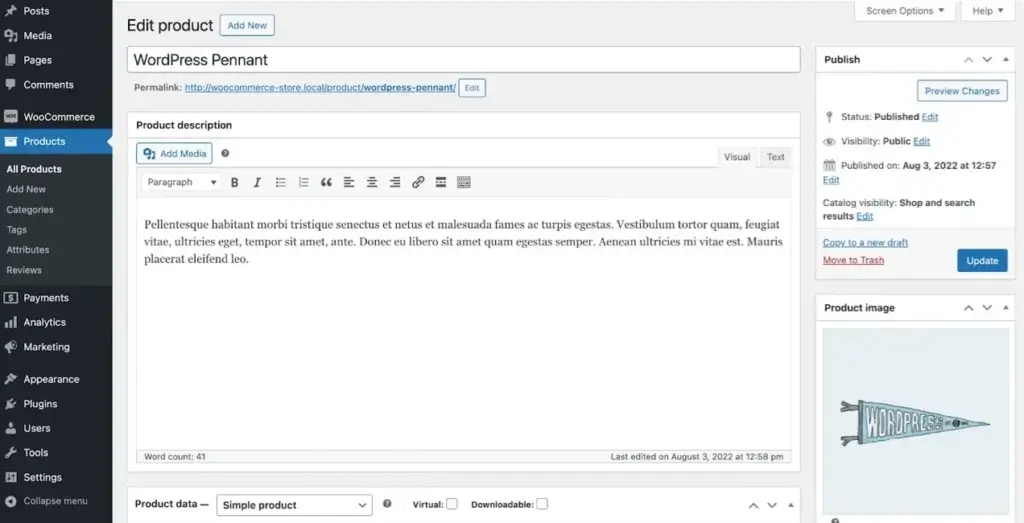
Every product page needs a unique, keyword-rich title tag, a compelling meta description, an H1 that matches search intent, optimized product copy, and image alt text.
A WooCommerce SEO expert also ensures product descriptions are detailed enough to satisfy Google’s content quality signals — thin pages with minimal copy are one of the top reasons product pages fail to rank.
Category Page SEO
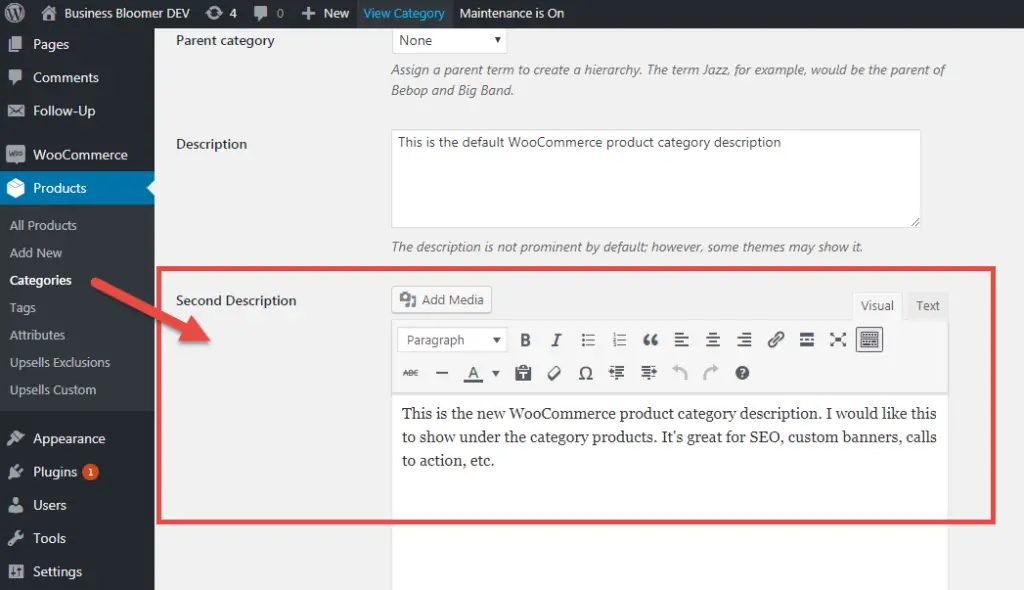
Category pages are often the highest-traffic opportunities in a WooCommerce store, yet most store owners ignore them. A specialist structures category hierarchies properly, adds keyword-optimized introductory text, and ensures internal linking passes authority from categories down to individual product pages.
Prioritizing category page optimization over product pages is key, as category pages capture users earlier in the research phase and target broader, higher-volume terms.
Schema Markup & Structured Data
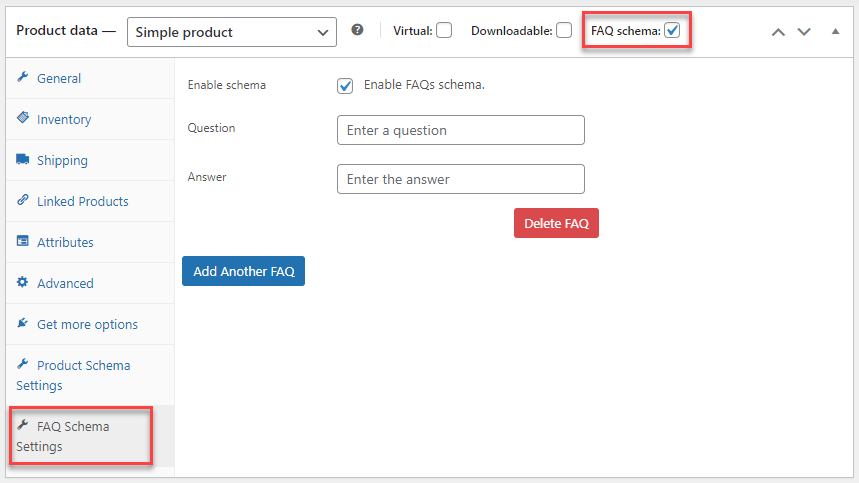
Implementing Product schema, Offer schema, AggregateRating schema, and Breadcrumb schema helps search engines understand your inventory and can unlock rich snippets in search results — price, reviews, stock status — all directly in the SERP.
Plugins like Rank Math Pro handle much of this automatically, but a specialist ensures the implementation is correct and complete.
Keyword Research
A WooCommerce SEO expert doesn’t just research keywords — they map them to buying intent. There’s a massive difference between someone searching for information and someone ready to buy.
Long-tail, high-intent keywords drive far higher purchase conversion rates than broad terms. In many stores, there’s a significant gap between internal product names and the terms customers actually use on Google. Closing that gap is often the single biggest traffic lever available.
On-Page Content Strategy
They align product and category page content with what buyers actually search for. Using vague category names like “Shoes” when a more specific title like “Waterproof Trail Running Shoes” would capture far more qualified, high-intent clicks is a mistake that costs stores real revenue — and a WooCommerce SEO specialist catches these opportunities systematically.
Content Marketing and Blog Strategy
WooCommerce store structure gives it a unique blogging advantage over platforms like Shopify. A specialist uses this to build topical authority through blog content that directly supports and internally links to product and category pages. High-performing blogs connect every post to relevant, in-stock SKUs rather than producing generic content that never converts.
Link Building
Earning backlinks to product and category pages builds domain authority over time. A specialist uses digital PR, guest posting, broken-link building, and creating link-worthy content to grow your store’s authority.
Analytics & Reporting
Tracking keyword positions, organic traffic trends, and — most importantly — revenue per session through Google Analytics 4 and Google Search Console keeps the strategy data-driven and focused on actual business results. Traffic is a vanity metric; revenue per session is the diagnostic one that matters.
Skills Every WooCommerce SEO Specialist Must Have
Not every SEO professional is qualified to handle a WooCommerce store. Here are the skills that separate the real experts from the generalists:
WooCommerce platform knowledge — Understanding how WooCommerce generates URLs, handles product taxonomies, and creates duplicate content through tags, attributes, and filtered views
Technical SEO proficiency — Fixing crawl issues, implementing canonical tags, improving Core Web Vitals (LCP, CLS, INP), and managing indexation
Keyword research expertise — Using tools like Ahrefs, SEMrush, or Google Search Console to find transactional keywords with real buying intent
On-page optimization — Crafting titles, meta descriptions, product copy, and heading structure that satisfy both users and search engines
Schema markup implementation — Adding structured data manually or through plugins like Rank Math Pro for product-specific rich results
Link building — Proven experience earning backlinks to ecommerce pages, not just blog content
Analytics interpretation — Reading GA4 and Search Console data to identify which pages are losing visibility and what’s driving organic conversions
Content strategy — Planning blog content that internally links to products and builds topical authority for your store’s niche
Plugin proficiency — Experience with Yoast SEO or Rank Math, WP Rocket for speed, image compression tools, and Asset CleanUp for removing unnecessary scripts
Site speed optimization — WooCommerce loads unnecessary cart fragment scripts and styles on every page by default; a specialist knows how to strip those out for faster load times
WooCommerce SEO Pricing
Pricing for WooCommerce SEO services varies based on the type of provider and scope of work. Here’s what you can expect to pay in the US market:
| Service Type | Hourly Rate | Monthly Retainer |
|---|---|---|
| Freelance WooCommerce SEO Expert | $35–$160/hr | $500–$5,000/mo |
| WooCommerce SEO Agency | $95–$220/hr effective | $1,500–$15,000/month |
| Entry-Level SEO Packages | – | From $499/mo |
| General SEO Services (market range) | $50$50–$200/hr$200/hr | $500–$10,000/mo |
What you pay depends on several factors:
- Store size — A 50-product store costs far less to optimize than a 5,000-product catalog
- Competitive landscape — Stores in saturated niches need more aggressive and ongoing work
- Scope of services — A one-time audit is cheaper than a full-service monthly retainer
- Provider type — Freelancers typically cost less than agencies, but may have limited capacity
- Geographic targeting — National campaigns cost more than local or regional ones
Freelancer Vs Agency Vs Consultant: Which Is Right for Your WooCommerce Store?
Choosing the right type of WooCommerce SEO provider depends on your budget, store size, and how involved you want to be. Here’s a direct comparison:
| Factor | WooCommerce SEO Freelancer | WooCommerce SEO Agency | WooCommerce SEO Consultant |
|---|---|---|---|
| Cost | Lower — $500–$2,500/mo typical | Higher — $1,500–$15,000/mo | Mid-range, often project-based |
| Communication | Direct, personal | Via the account manager | Direct, strategic focus |
| Scalability | Limited by one person’s capacity | Scales with your needs | Best for strategy, less for execution |
| Specialization | Deep niche expertise possible | Full-team coverage of all SEO areas | High-level strategic guidance |
| Consistency | Risk if the freelancer becomes unavailable | More reliable; the team handles continuity | Varies by engagement |
| Best For | Small-to-mid stores, tight budgets | Growing stores needing full-service SEO | Stores needing a strategy overhaul |
If you’re running a small WooCommerce store and want personalized attention without paying agency retainer fees, a WooCommerce SEO freelancer is often the smart starting point.
If you’re scaling fast and need technical, content, and link-building work happening simultaneously, a WooCommerce SEO agency brings the team depth to execute across all fronts.
A WooCommerce SEO consultant sits in the middle — ideal for store owners who have an in-house team but need expert direction, a strategic audit, or someone to fix a major traffic drop without committing to a long-term retainer.
5 Signs You Need to Hire a WooCommerce SEO Expert
Most store owners wait too long. Here are the five most common signs it’s time to bring in professional help:
1. Your organic traffic has flatlined or dropped — If month-over-month traffic isn’t growing, something is wrong technically or strategically
2. Your product pages aren’t ranking — If competitors keep showing up for product searches and you don’t, keyword targeting and on-page optimization need work
3. You’re getting traffic but no sales — This points to search intent mismatch — you’re likely ranking for informational queries instead of transactional ones
4. Your store has hundreds of products, but no SEO structure — Large catalogs without proper category architecture, internal linking, or duplicate content controls create serious crawl and indexation problems
5. You’ve tried plugins, but nothing changed — Rank Math and Yoast help, but they don’t replace strategy. A WooCommerce SEO specialist takes those tools much further
Common WooCommerce SEO Mistakes to Avoid
Most WooCommerce stores have the same problems. Knowing what they are helps you understand exactly what you’re hiring someone to fix:
Duplicate Content from Default URL Settings
WooCommerce creates duplicate content by default. When a product is assigned to multiple categories, it generates multiple URLs for the same page. Search engines struggle to pick the right one to rank, and often rank none of them well.
The fix involves canonical tag configuration and permalink cleanup — something that requires hands-on technical knowledge.
Ignoring Category Pages
Most store owners optimize product pages and forget that category pages are the real traffic drivers for broad commercial searches. A specialist adds SEO copy, structures internal links, and optimizes category names to capture higher-intent clicks.
Slow Store Speed
WooCommerce loads unnecessary cart fragment scripts, checkout styles, and plugin assets on pages where they’re not needed.
This drags down load times across the entire store. Asset CleanUp, WP Rocket, and image compression are part of every serious WooCommerce SEO toolkit.
Thin Product Descriptions
Copying manufacturer descriptions or writing two-sentence product blurbs hurts rankings. Google needs enough original content to understand what a page is about and why it should rank.
Missing Schema Markup
Without a Product and Review schema, your listings show up as plain blue links while competitors with schema get star ratings, prices, and stock info directly in search results. That difference in appearance directly impacts click-through rates.
Ignoring Mobile Experience
With Google’s mobile-first indexing in full effect, a WooCommerce store that looks great on desktop but is clunky on mobile loses ranking ground daily. A specialist audits the mobile experience as part of the standard technical review.
Best Tools a WooCommerce SEO Expert Uses
A qualified WooCommerce SEO specialist doesn’t work blind. Here’s the core toolkit you should expect them to use:
| Tool | Purpose |
|---|---|
| Google Search Console | Indexation monitoring, keyword impressions, and CTR data |
| Screaming Frog | Full site crawl to find broken links, duplicate content, and redirect chains |
| Ahrefs or SEMrush | Keyword research, backlink analysis, competitor tracking |
| Rank Math Pro or Yoast SEO Premium | On-page SEO, schema markup, sitemap management |
| WP Rocket | Page caching and speed optimization |
| Asset CleanUp | Removing unnecessary WooCommerce scripts on non-shop pages |
| Google Analytics 4 | Organic traffic trends, revenue attribution, and conversion tracking |
| ShortPixel, Imagify, or TinyPNG | Image compression without quality loss |
If a WooCommerce SEO specialist can’t name the tools they use, that’s an immediate red flag. This toolkit is standard for anyone doing serious e-commerce SEO work.
How Long Does WooCommerce SEO Take to Show Results?
One of the most common questions store owners ask before hiring is: ” How long until I see results?
The honest answer is: SEO takes time, but the compounding returns are worth it. On average, most websites start seeing measurable improvements in organic traffic within three to six months. Highly competitive markets can take 12 months or more.
Here’s a realistic timeline for a WooCommerce store:
- Month 1–2: Technical audit, fixing crawl errors, cleaning up duplicate content, setting up proper tracking. The foundation work. You won’t see big traffic jumps yet, but you will stop losing ground.
- Month 2–3: On-page optimization of top product and category pages, schema implementation, keyword mapping. Rankings start to move for lower-competition terms.
- Months 3–6: Blog content starts gaining traction. Link-building efforts begin compounding. Organic sessions start a consistent upward trend for mid-competition keywords.
- Months 6–12: Authority builds. Competitive keywords start ranking. Organic revenue becomes measurable and trackable.
What makes SEO a smarter long-term investment than paid ads is that the results compound and persist. When you stop running Google Ads, traffic drops to zero immediately.
When you pause SEO, rankings hold for an extended period — data shows that organic traffic typically maintains its position for around 12 months after SEO activities stop before beginning to decay. That durability is the core financial argument for investing in WooCommerce SEO services.
The average 12-month SEO ROI across ecommerce is 3.2x, with a strong benchmark of 5:1 return — meaning $5 in profit for every $1 spent on SEO. Specialty retail stores tend to outperform that benchmark due to lower competition and higher buyer intent in niche searches.
What to Expect from a WooCommerce SEO Expert
When you hire a WooCommerce SEO expert, here’s what a comprehensive engagement typically includes:
- Full WooCommerce SEO audit (technical, on-page, off-page)
- Keyword research mapped to product and category pages
- Product and category page optimization
- Schema markup implementation (Product, Review, Breadcrumb, Offer)
- Site speed and Core Web Vitals optimization
- Duplicate content and URL structure fixes
- Internal linking strategy
- Blog content planning to drive topical authority
- Backlink acquisition and digital PR
- Monthly performance reporting and strategy updates
Some WooCommerce SEO agencies offer tiered packages. Entry-level packages starting around $499/month typically cover smaller product catalogs and basic optimization work.
Larger packages scale up to handle enterprise-level stores with thousands of SKUs. Always clarify exactly what’s included and what metrics define success before signing any agreement.
How to Hire the Right WooCommerce SEO Expert
Finding someone who claims to know WooCommerce SEO and finding someone who can actually prove it are two different things. Here’s how to vet candidates properly:
Ask for WooCommerce-specific case studies. General SEO results don’t tell you much. You want to see before-and-after organic traffic data from real WooCommerce stores, ideally in a niche similar to yours.
Ask about duplicate content handling. Ask how they’d handle duplicate content from faceted navigation in WooCommerce. A qualified specialist will immediately mention canonical tags, robots.txt adjustments, and crawl budget management.
Check their tool stack. Experienced WooCommerce SEO experts use Google Search Console, Screaming Frog, Ahrefs, or SEMrush, and Rank Math or Yoast Pro as a baseline. Anyone who can’t name their tools lacks the depth you need.
Ask about their reporting process. You should receive regular reports showing keyword position changes, organic traffic trends, and revenue from organic channels — not just activity logs describing what they did.
Ask what results they expect and when. A good WooCommerce SEO consultant or freelancer will be honest about timelines. Anyone promising first-page rankings in 30 days is lying.
Clarify deliverables in writing. Whether you’re hiring a WooCommerce SEO agency, a freelancer, or a consultant, get a clear scope of work: what gets done each month, what tools are covered, who owns the accounts, and what happens if you part ways.
WooCommerce Vs Shopify: Why Platform-Specific SEO Expertise Matters
If you’ve ever wondered whether a general ecommerce SEO specialist can handle your WooCommerce store, this comparison makes the case for platform-specific expertise.
WooCommerce gives store owners far more control over their SEO than Shopify does. You can customize URL structures, edit canonical tags directly, add custom schema, and fine-tune robots.txt settings without being locked into a platform’s default behavior. Shopify restricts URL paths to a fixed collections/products format and limits access to robots.txt and sitemap files.
That flexibility is a massive advantage — but only if someone knows how to use it correctly. WooCommerce’s open architecture means more opportunities to optimize, but also more ways to accidentally create duplicate content, crawl traps, or indexation problems. A WooCommerce SEO expert understands both sides of that equation.
For long-term organic growth through content marketing, WooCommerce’s deep WordPress integration is a clear structural advantage. You can build blog content, landing pages, and buying guides that feed authority directly into your product catalog — something Shopify’s basic blogging features simply can’t match.


![How Much Does an SEO Expert Cost in 2026 [SEO Pricing]](https://seovisibility.co/wp-content/uploads/2026/01/how-much-does-an-seo-expert-cost.png)